How to Unf*ck the "What Are We Even Building?"
After many discovery calls, you’ve got a good overview of all the challenges users face. The interviews provided so much valuable information. But the more info gets dumped on you, the more your brain screams for some order, structure, and a hint of what’s coming next. Above all, you need to see the picture on the puzzle box so you can start assembling the pieces one by one and make sense of everything.
Things that the unpredictable chaos of product development doesn’t gift so easily. Fortunately, there’s one tool I fell in love with many moons ago called User Story Mapping.
User Story Mapping’s whole point is to get everyone on the same page about what you’re building — shockingly, even engineers! — and to help find out what users need, discover different ways to reach user goals, and show clearly how user steps connect. By looking at each step and asking questions like “what could confuse a user here?” or “what the heck they may want to do next?”, product teams can find important tasks they might have missed.
This makes story mapping a total lifesaver for kicking off ideas, getting a handle on what absolutely needs to be built, figuring out where to even start, and seeing how all the user’s needs link up across the entire product.
User Story Mapping 101
Imagine the journey your user takes with your product, laid out in an easy-to-understand way. That’s what we’re doing here.
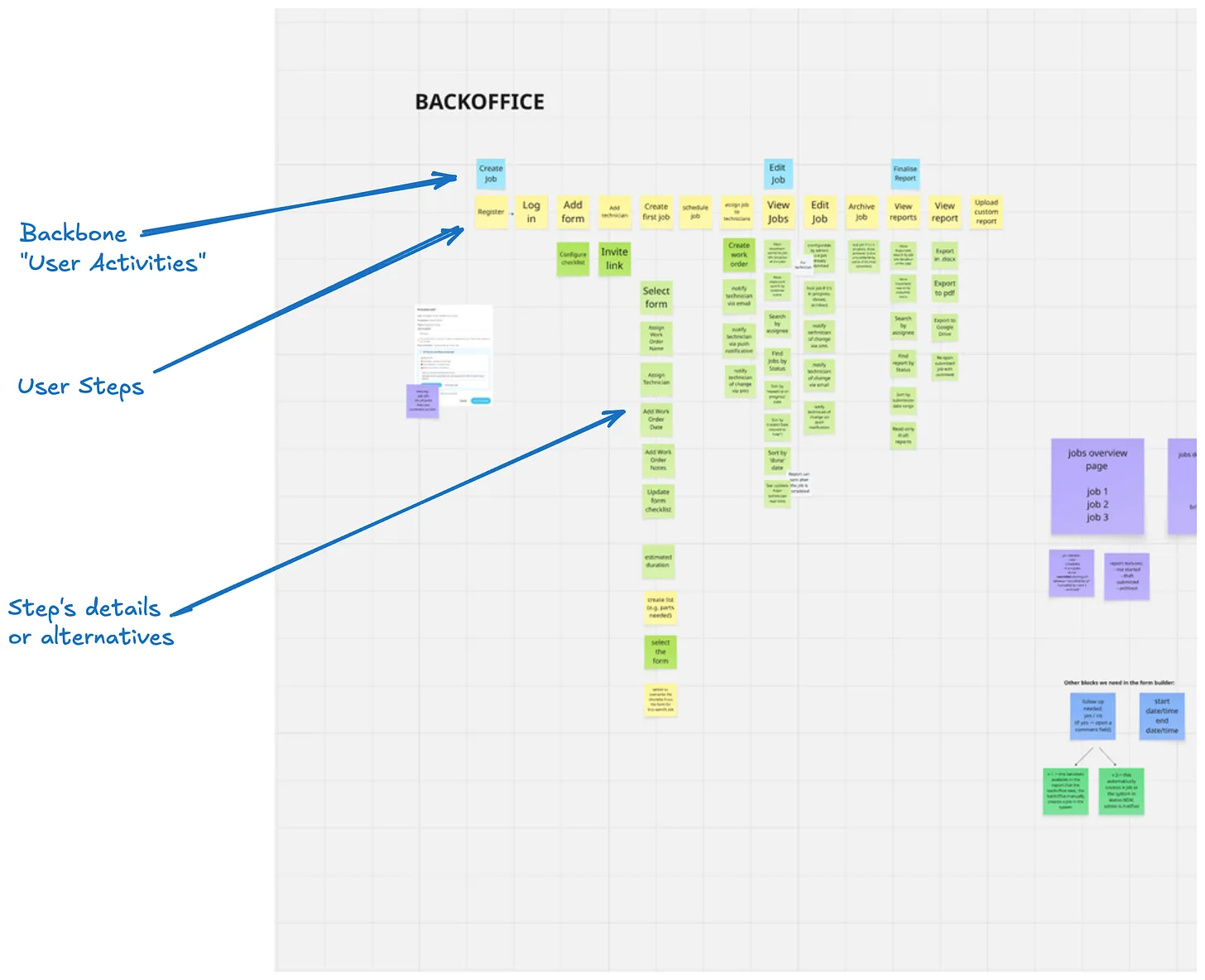
A story map has 4 main components:
- User Activities
- User Steps
- Details or Alternatives
- Releases
Let’s look at each one of them together.
User Activities
These are the main groups of steps that help users achieve a goal. They form the “backbone” of your map — the top row that helps you navigate different areas of your product. Activities are usually bigger pieces of work that teams might call “epics” (but you don’t have to), and they need to be broken down into smaller steps.
User Steps
These are the individual actions users take within each activity, arranged from left to right across the map. You read them by thinking “then” between each card. For example, “select recipients, then enter subject, then compose message, then send email”. These steps show the real order of actions a user takes and usually become the small user stories you implement.
Details or Alternatives
The up-and-down part of the map shows different ways to do each step. You read these by thinking “or” between cards. For example, selecting email recipients could be done by typing an email address or typing a recipient’s name or choosing from a contacts list or selecting from past recipients. These options are ordered from most important (top) to least important (bottom), which helps teams decide which way to do it first when they have limited time.
Releases
Story maps can easily be turned into roadmaps by adding horizontal lines to separate different releases or milestones. Everything above a line is what must be included in that release (like the first version, or the release for Quarter 3). This visual way helps product owners show the planned order of features for upcoming releases. It makes it clear which options from each step will be available in each version.
You can create a story map for a whole product or just one feature. And no, you don’t need to be a product manager or in a leadership position to do it. Just open your favourite whiteboard tool and start building it at any time. It will help you think more clearly, and you can use it to help plan your work or communicate with your team.
If you want to know more about user story maps and how to use them, I recommend reading the book from User Story Mapping’s creator, Jeff Patton, or feel free to reach out to me if you have any questions.
Hey! I’m Peppe, and I’m a freelance Product Engineer.
Are you shipping fast but unsure of your impact? My Product Experiments as a Service helps you validate ideas, learn quickly, and build what truly matters, before full development.
Ready to transform your workflow and get real answers?
📅 Book a call: https://cal.com/giuseppe-silletti/virtual-coffee-peppe ✉️ Email: himself@peppesilletti.io